Microsoft Teams is one of the leading hubs for team collaboration. It brings teams together and helps them to collaborate on a whole new level. But what if we tell you that you can boost your Microsoft Teams’ experience by adding gamification?
This guide is for team leaders, managers, and IT admins looking to enhance engagement in Microsoft Teams. We will cover strategy, tools, and best practices for adding gamification to Teams.
Getting Started with Microsoft Teams
Microsoft Teams is a powerful collaborative environment designed to help teams communicate, share files, and work together seamlessly. As a central hub for teamwork, Microsoft Teams brings together chat, meetings, and apps, making it easier for employees to collaborate and stay connected, whether they’re in the office or working remotely. By leveraging the built-in tools and features of Microsoft Teams, organizations can significantly enhance employee engagement, boost team performance, and support ongoing skill development.
Integrating gamification elements—such as rewards, engaging challenges, and progress tracking—into Microsoft Teams transforms routine tasks into motivating experiences. A well-crafted gamification strategy within Teams channels can foster collaboration, encourage healthy competition, and drive task completion. With features like performance metrics and real-time feedback, teams can celebrate achievements and track progress toward shared goals, creating a more productive and engaging work environment.
Microsoft Teams offers a variety of tools to support gamification, including customizable teams channels, collaborative workspaces, and analytics dashboards. These features empower organizations to create engaging experiences that motivate employees, recognize accomplishments, and inspire everyone to participate actively. By integrating gamification into Microsoft Teams, companies can unlock new levels of engagement, collaboration, and performance across their workforce.
Understanding Gamification and Its Impact

Gamification incorporates game-like elements into non-game contexts to foster user involvement, motivation, and loyalty.
Modern organizations have a focus on engaged employees and are always looking for creative ways to motivate and involve users through gamification. Microsoft’s gamification strategy has proven to be a powerful tool in boosting user satisfaction and loyalty. Gamification drives higher productivity, with 90% of employees reporting improved performance.
Every giant firm uses gamification solutions to boost the productivity and motivation of their employees, and many world-renowned companies use gamification successfully across industries. According to an article on Medium, 90% of employees feel more productive when using gamification. The ability of gamification to improve engagement and user satisfaction within the Microsoft ecosystem makes it an essential strategy for organizations.
Why Add Gamification to Microsoft Teams?
So why not add gamification to Microsoft Teams? Incorporating game-design elements into non-game contexts, such as Microsoft Teams, can enhance engagement and productivity.
In today’s piece, we’ll tell how you can add gamification software to Microsoft Teams. We’ll showcase three apps and integrations that easily add gamification to Microsoft Teams, including how to integrate gamification into Microsoft Teams.
Developing a Gamification Strategy
Developing a gamification strategy is the cornerstone of unlocking higher employee engagement, improved team performance, and ongoing skill development within Microsoft Teams. By thoughtfully integrating gamification elements into routine tasks, organizations can transform everyday work into engaging experiences that motivate employees and drive results.
The first step in crafting an effective gamification strategy is to clearly define your goals. Are you aiming to boost task completion, foster a collaborative environment, or elevate performance metrics for your sales teams? Pinpointing these objectives will help you design engaging challenges and reward systems that truly resonate with your team.
Once your goals are set, it’s time to bring your strategy to life using Microsoft Teams and its robust ecosystem. Incorporate game design elements like points, badges, leaderboards, and progress bars to make achievements visible and meaningful. These gamified elements not only recognize individual and team accomplishments but also encourage healthy competition and peer recognition—key drivers of motivation and participation.
Leveraging Microsoft Teams’ integrations with third-party apps and tools, such as top AI-driven gamification tools available in the Microsoft ecosystem, allows you to track progress and measure performance in real time. For example, integrating Microsoft Dynamics can help embed gamification into business processes, making it easier to monitor response times, celebrate achievements, and drive ongoing learning across your organization.
Personalizing and Fostering Social Interaction in Gamification
Personalization is another powerful way to enhance gamification. Tailor challenges, rewards, and recognition systems to fit the unique needs of your teams, grounding your approach in the psychology of why gamification works. Offer more advanced features for power users or create gamified elements in non-game contexts to keep everyone engaged, regardless of their role or experience level.
A successful gamification strategy also thrives on social interaction. Use Teams channels to share achievements, highlight top performers, and encourage employees to participate actively. This collaborative environment not only boosts engagement but also fosters a sense of community and shared purpose.

Ultimately, a well-developed gamification strategy within Microsoft Teams is a powerful tool for driving engagement, improving performance, and fostering collaboration. By combining game mechanics, real-time tracking, and meaningful recognition, organizations can create a productive, motivated workforce ready to tackle any challenge. Whether you’re looking to improve response times, enhance customer satisfaction, or drive sales performance, integrating gamification into your Microsoft Teams environment can help your teams achieve their goals—and have fun doing it.
Incentives Power App by Microsoft
Incentives Power App is a Power Apps template that adds gamification to Microsoft Teams. It rewards employees for learning new skills, hitting milestones, and achieving goals. By integrating with Microsoft technologies like SharePoint, Power BI, Viva, and Dynamics 365, it helps implement strong reward systems within Teams, boosting motivation and productivity, especially when paired with Spinify’s gamification integrations.
Admins can set up activities, rewards, and criteria, customize dashboards, and create challenges to encourage behaviors like faster follow-ups. Employees see their progress and real-time leaderboards showing rankings based on key performance indicators (KPIs). The app is fully customizable to meet team and business needs, making gamification simple and effective.
Gamification Benefits and Learning Impact
Employees can track their progress and receive digital badges for reaching milestones, fostering morale and recognition. Completing modules and earning points and badges is also possible through Microsoft Viva Learning’s gamified learning pathways. Gamification simplifies training and onboarding, turning learning into a rewarding experience, and gamified training modules can reduce training time by up to up to 300%. Gamification leverages feedback loops and social motivation to engage users consistently. It can significantly impact training and development by making the process interactive and fun, leading to better retention of information.
Incentives Power App by Microsoft is the true definition of maximizing the potential of gamification. As it’s an app regulated and made for Microsoft Teams, users will not experience any glitch or problems while applying their customizations to it, and it pairs well with top AI gamification tools that extend these capabilities across your wider tech stack.
Microsoft Teams + Spinify
Now it’s time for us to take the spotlight and show what we have got. Being the world’s best sales gamification software company with an AI-powered sales gamification platform, we have finally announced our app/integration for Microsoft Teams. And the final product is better than we even imagined! Spinify uses proven gamification strategies to improve engagement and motivate users, leveraging AI-driven gamification to enhance team performance and giving organizations the ability to drive performance and achieve their goals through fun and interactive experiences, and our demo center highlights how these features work in practice. Spinify also engages users in creative ways, making the process of learning and adopting Microsoft products more enjoyable and effective.

Our beloved customers who have been using Spinify on other platforms can now use it with Microsoft Teams with an even greater experience, benefiting from Spinify integrations across 100+ apps to keep data and achievements in sync. And what’s even better is that anyone can set up Spinify with Microsoft Teams within minutes – no IT members are required!
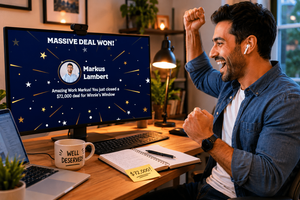
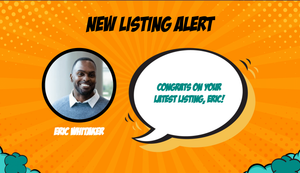
What’s attractive with Microsoft Teams + Spinify is that achievement notifications are sent to Team channels so that everyone can see, react, and up-skill their game. Next-up, an interactive leaderboard shows how the team is doing on a specific goal or activity. Spinify provides real-time leaderboards for sales teams within Microsoft Teams, allowing teams to track progress and celebrate wins instantly. To fuel the competition, Spinify lets admins set the target, rewards, game mechanics, celebration criteria, and everything in between.
Features and Setup of Spinify with Microsoft Teams
Installing Spinify with Microsoft Teams is quick and easy—admins simply find the app in the Teams store, select a channel, and follow prompts to complete setup. By incorporating rewards, challenges, and feedback loops, Microsoft transforms routine tasks into engaging experiences that drive participation and performance. Spinify’s features, along with resources and blogs on team motivation, help organizations maximize employee engagement and improve team performance through gamified elements.
Best Practices for Implementation
Implementing gamification in Microsoft Teams can be a powerful tool to boost employee engagement, improve team performance, and drive ongoing skill development. To get the most out of your gamification strategy, it’s important to follow a set of best practices that ensure your efforts are both effective and sustainable.
Define Clear Objectives
- Define Clear Objectives: Start by aligning your gamification strategy with your organization’s business goals. Whether you want to increase task completion, enhance skill development, or motivate your sales teams, having clear objectives will help you choose the right gamification elements and measure performance accurately.
Choose the Right Tools
- Choose the Right Tools: Leverage Microsoft Teams’ built-in features, such as the Incentives Power App, or integrate third-party apps like Spinify to enhance gamification. These tools make it easy to add game design elements—like points, badges, and progress bars—directly into your teams channels, helping you track progress and celebrate achievements in real time.
Create a Collaborative Environment
- Create a Collaborative Environment: Foster collaboration by encouraging peer recognition and healthy competition. Use teams channels to share achievements, highlight top performers, and create a sense of community. This collaborative environment motivates employees to participate actively and support each other in reaching shared goals.
Monitor Performance Metrics
- Monitor Performance Metrics: Regularly track performance metrics to measure the impact of your gamification strategy. Use analytics to identify trends, spot areas for improvement, and ensure that your approach continues to enhance engagement and productivity across your teams.
Design Engaging Challenges
- Design Engaging Challenges: Keep things fun and relevant by designing engaging challenges that align with your business objectives. Incorporate game-like elements such as achievement badges, points, and progress bars to make routine tasks more exciting and encourage employees to complete modules and reach milestones.
Recognize and Reward Achievements
- Recognize and Reward Achievements: Implement a reward system that celebrates both individual and team accomplishments. Recognizing achievements—whether it’s completing training, hitting sales targets, or improving response times—helps motivate employees and reinforces positive behaviors.
Provide Ongoing Learning Opportunities
- Provide Ongoing Learning Opportunities: Support ongoing learning by offering training and education on new technologies and tools, such as Microsoft Dynamics. Gamified elements can make learning more interactive and enjoyable, encouraging employees to develop new skills and stay engaged.
Encourage Participation
- Encourage Participation: Invite employees to participate actively in the gamification process. Solicit feedback and suggestions to ensure your strategy remains relevant and effective, and make it easy for everyone to get involved, regardless of their role or experience level.
Continuously Evaluate and Improve
- Continuously Evaluate and Improve: Regularly assess your gamification strategy’s effectiveness and be open to incorporating more advanced features or new technologies. This ongoing evaluation helps keep the experience fresh, engaging, and aligned with your evolving business needs.
Communicate Effectively
- Communicate Effectively: Keep all stakeholders informed about your gamification strategy, its objectives, and the benefits it brings. Use Microsoft Teams’ communication tools and solutions to promote awareness, share updates, and encourage participation across the organization.
By following these best practices, organizations can create a gamification strategy within Microsoft Teams that not only improves engagement and team performance but also fosters a productive, motivated, and collaborative workforce. With the right approach, gamification can transform routine tasks into engaging experiences, drive ongoing learning, and help your teams achieve their goals together.
Best Sales Gamification Software with Microsoft Teams Integration
With all that said, here at Spinify, we are the world’s leading and renowned software company for sales gamification, backed by a passionate team behind Spinify. Our Microsoft Teams integration has made gamification easy for the people who prefer Microsoft Teams over other collaboration applications and want to take advantage of AI-powered gamification platforms. Experience true gamification software in Microsoft Teams with our app, explore pricing for our sales gamification platform, contact our team for support and questions, and feel free to provide feedback at our Twitter handle.